
Back to home

Home/Projects/Task Management App

Consumer app · Product designMobile + responsive web

Personal Productivity.
Goals, money, and tasks in one place.

A productivity app that combines goal planning, budget tracking, and task management into a single simple experience — so users can see what to do next and how to actually get there.

Personal Productivity Assistant hero image

Role

Solo Product Designer

End-to-end

Timeline

1 week

Concept → prototype

Platform

iOS + Web

Responsive

Tools

Figma · Base44

AI-assisted build

01
Project overview

A single assistant for the things people juggle every day.

Most people manage money, tasks, and reminders in three different apps. This concept combines them around a shared question: what do I need to do next?

Challenge

People have goals but struggle to organize the steps — especially when goals depend on money, time, and daily follow-through.

Opportunity

Combine financial planning with everyday productivity in one tool so users can see the whole picture at once.

Solution

A three-pillar app — Goals, Tasks, Reminders — where each pillar informs the others and reduces mental load.

02
My role

Solo designer across a one-week concept sprint.

From problem framing to a working AI-assisted prototype in seven days, owning the research, structure, flows, UI, and build.

What I owned

I owned all of it — concept validation, competitive analysis, IA and flows, wireframes, UI, prototyping and interaction design, and the AI-assisted build.

03
The problem

Personal goals get lost in the gap between money, time, and tasks.

People want to save for things, remember what's due, and stay organized — but the tools for each live in separate apps that don't talk to each other.

What's going wrong

A financial goal stays abstract until someone translates it into a weekly number, tasks scatter across lists, and juggling separate apps for money, tasks, and reminders becomes its own chore.

The solution in one line

One assistant that turns a goal into a realistic weekly plan, tracks the tasks that support it, and reminds you at the right moment.

04
Research & insights

A small concept-validation exercise, not a formal study.

I tested the concept with 4 people from my network and audited common productivity apps — small-scale validation, enough to pressure-test the idea, not to generalize.

Study at a glance

4

Participants from my personal network — concept validation.

4

Common productivity apps audited (competitive analysis).

3

Distinct planning behaviors observed.

What research told me

  • 01Participants had goals but no clear plan for reaching them, and financial goals only felt real once broken into a weekly amount.
  • 02Tasks and reminders were split across apps that don't share context.
  • 03Heavy setup was the main reason past planning tools got abandoned.

With four participants this is directional, not conclusive — but consistent enough to shape the concept: simple inputs, clear outputs, no setup tax.

"I want to save for a car but I have no idea how long it'll actually take."
— Concept validation participant, 29
05
User personas

Two people this app is designed for.

Different lives, same need: a simple way to make progress on personal goals.

Alex Turner — portrait

Persona

Alex Turner

Young Professional

Age 27 · Software developer

Juggling meetings, side projects, and personal admin. Needs one place to keep track of goals and tasks.

Motivation

Wants to save for a first home while staying on top of daily commitments.

Goals

  • Save consistently each month.
  • Organize daily tasks.
  • Remember appointments and deadlines.

Pain points

  • Task lists live in too many apps.
  • Progress on savings feels invisible.
  • Planning tools feel heavier than the problem.

Nina Park — portrait

Persona

Nina Park

College Student

Age 21 · University student

Balancing classes, part-time work, and a tight budget. Learning to plan life beyond the semester.

Motivation

Wants to graduate debt-free and build habits that last beyond school.

Goals

  • Track a limited monthly budget.
  • See weekly progress on study goals.
  • Simple daily task list.

Pain points

  • Budget feels tight and unpredictable.
  • Goals feel distant.
  • Existing tools are overkill.
Diana Cole — portrait

Persona

Diana Cole

Busy Parent

Age 38 · Operations lead & parent of two

Managing kids' schedules, household bills, and her own goals. Needs quick capture and gentle reminders.

Motivation

Wants the family's plans, bills, and personal goals in one calm place.

Goals

  • One home for goals, budget, and tasks.
  • Gentle reminders that don't nag.
  • Fast capture on mobile.

Pain points

  • Reminders slip through the cracks.
  • No time to configure complex apps.
  • Personal goals fall behind family needs.
06
Competitive analysis

Great single-purpose tools, no single home.

Productivity, finance, and reminder apps each solve one piece — none of them solve the whole picture.

Competitor

Todoist

A leading task manager with strong organization features.

Strengths

  • Powerful task organization.
  • Cross-platform sync.
  • Reliable reminders.

Weaknesses

  • No financial planning.
  • No goal-to-plan translation.
  • Feature-heavy for casual users.

How this concept improves

Combine task management with goal and budget context in one flow.

Competitor

YNAB (You Need A Budget)

A budget-focused financial planning app for zero-based budgeting.

Strengths

  • Excellent budget model.
  • Strong community.
  • Detailed financial tracking.

Weaknesses

  • Steep learning curve.
  • Requires disciplined setup.
  • Not a productivity tool.

How this concept improves

Simplify the budget input to what users actually enter — income, bills, goal — and generate a plan.

Competitor

Apple Reminders

System-level reminders with basic list support.

Strengths

  • Zero-setup use.
  • Ubiquitous on iOS.
  • Reliable notifications.

Weaknesses

  • No planning layer.
  • No goal or budget context.
  • Basic organization.

How this concept improves

Reminders live inside a goal and task context, not in isolation.

07
Key design decision

Start with the goal, not the task list.

Task apps start with tasks. This app starts with what the tasks are for.

By anchoring the entire experience to a goal — with a real timeline and a weekly amount — every task and reminder gets a reason to exist. That reason is what keeps users coming back.

Task-first model

Add tasks → hope they add up to progress.

This concept

Set a goal → get a realistic plan → track the tasks and reminders that support it.

Why it matters

  • Turns abstract goals into concrete weekly steps.
  • Gives tasks and reminders meaningful context.
  • Reduces the mental load of managing three separate tools.
08
User flow

From opening the app to seeing a plan.

Short path from goal to action.

01

Open app

Launch on mobile or web.

02

Enter income

Monthly income after taxes.

03

Enter bills

Monthly recurring expenses.

04

Set goal

Amount and target date.

05

See plan

Weekly savings target calculated.

06

Add tasks

Personal to-dos and follow-ups.

07

Add reminders

Appointments and deadlines.

08

Get nudges

Contextual reminders at the right moment.

09

Track progress

See how close you are to the goal.

10

Adjust

Update inputs as life changes.

09
Information architecture & wireframes

Three pillars, one home.

Wireframes established the Goals → Tasks → Reminders structure with a shared home screen.

10
Prototype testing

Feedback focused the flow.

Prototype tested with target users. Three findings reshaped the experience.

01

Problem

Goal setup felt heavy.

Observation

Users hesitated at too many financial inputs.

Design improvement

Reduced to three inputs: income, bills, goal. Everything else derived.

02

Problem

Tasks felt disconnected from goals.

Observation

Testers didn't see how their tasks helped progress.

Design improvement

Added a goal context strip at the top of the tasks view.

03

Problem

Reminders felt like a second app.

Observation

Users treated reminders as separate from tasks.

Design improvement

Unified reminders and tasks into one timeline with type filters.

11
Design evolution

Before, and after.

Every iteration comes from a testing observation.

  1. 01 · Iteration

    Goal setup

    Cut inputs from seven to three. Faster to start, easier to trust.

  2. 02 · Iteration

    Home screen

    Simplified to goal + today + upcoming. Everything else lives one tap away.

  3. 03 · Iteration

    Unified timeline

    Tasks and reminders live in the same list with clear type indicators.

12
Final design

The finished mobile experience.

High-fidelity screens showing the three-pillar structure in action.

01 · Screen

Goal setup

Three inputs — income, bills, goal — and the app calculates a realistic weekly savings target.

02 · Screen

Choose your focus

Pick what you want to work on today: goal progress, tasks, or reminders.

03 · Screen

Today's plan

Tasks and reminders unified into one timeline with clear type indicators and priority.

04 · Screen

Task detail

Tap a task to see context, subtasks, and its connection to your goal.

05 · Screen

Progress view

See goal progress, weekly saving streak, and what's coming next — grouped for scannability.

12.1
Final product

Product screenshots

Selected screens from the shipped design.

Financial Overview
Income Setup
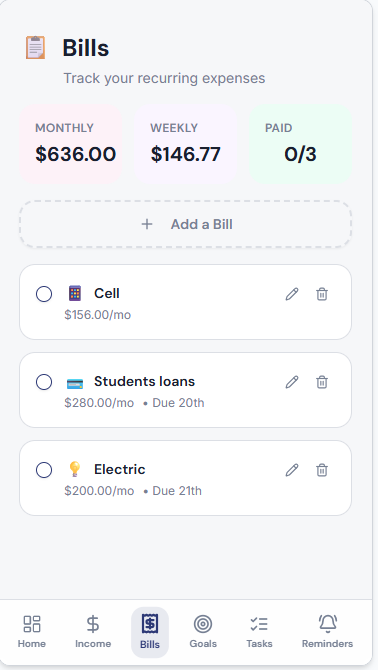
Bills Tracking
Goal Planner
Task Management
Reminder System
13
Success metrics I'd track

How I'd measure whether the app is working.

Because this is a concept product, these are the metrics I would use to evaluate whether the experience is working after launch — proposed targets, not measured results.

MetricTarget
Time to first plan< 90 sec
Goals completedTrend up
Daily active users≥ 40%
Tasks completed≥ 60%
Retention W1≥ 45%
Goal-to-task ratio3:1 avg
14Outcome & reflection

Simplicity as the feature.

This concept shows how multiple functions can live in one coherent experience without overwhelming the user.

What I learned

Combining tools is less about features and more about a shared mental model — every screen has to reinforce it.

Challenges

Avoiding the trap of building three apps in one. The pillars had to genuinely support each other.

What's next

AI-suggested tasks based on goal progress, and shared goals for households or couples.

15Reflection

People need less, done better.

The clearest lesson: users don't want more features, they want less friction between where they are and where they want to be.

15.1
Project constraints

Designing inside real limits.

A one-week sprint forced sharp scope.

Constraint

Time-boxed sprint

One week from concept to prototype — every feature had to earn its place.

Constraint

Zero onboarding

The app had to be immediately useful without a tutorial.

Constraint

Mobile-first

Designed for use in the moments between everything else.

Constraint

Simple math, real outputs

Calculations had to be easy to trust and easy to adjust.

15.2
Design system

A small system, tuned for calm daily use.

Type, color, and components chosen for clarity in short interactions.

Typography

Display

Personal Productivity

Instrument Serif

Heading

This week

Inter

Body

Save $180 to stay on track for your goal.

Inter

Caption

Updated just now

Inter

Color palette

Ink

Foreground

Paper

Background

Surface

Surface

Accent

Focus green

Accent soft

Green tint

Muted

Muted

Buttons

Spacing scale

8
12
16
24
32
48
64

Components

$15,000

Car

Task · Admin

Renew car insurance

15.3
Accessibility considerations

Designed for real, distracted use.

Accessibility choices shaped from the first wireframe.

01

High contrast

Body and CTAs meet WCAG AA on all surfaces.

02

Plain language

No jargon — buttons and labels say what they do.

03

Large tap targets

All primary actions are at least 44×44px.

04

Clear visual hierarchy

Goal, tasks, and reminders are distinct without leaning on color.

05

Predictable structure

The same three pillars appear in the same order everywhere.

15.4
Future improvements

Where this app goes next.

With more time, these are the directions I'd validate next.

Next

AI-suggested tasks

Recommend tasks that map to the user's active goal each week.

Next

Shared goals

Couples or households working toward a shared savings goal together.

Next

Bank connections

Optional bank connection to auto-track progress without manual entry.

Next

Habit tracking

Add habit streaks tied to the goal, not just isolated tasks.